A Simple Daily Briefing Idea
Over the last week, I've been experimenting with a simple idea:
Could I build an AI-powered daily briefing that tells me what I should focus on each morning?
What started as a custom Gem in Gemini evolved into a Workspace Studio workflow and eventually into a fully automated n8n pipeline.
The final result isn't particularly revolutionary. Every morning it reviews my email, reviews my calendar, identifies important commitments, and generates a briefing with recommended priorities and next actions.
The surprising part wasn't the tool itself.
The surprising part was what it taught me about AI.
Each version worked better than the last, but not because I used a better model or wrote a better prompt. Each version improved because I became better at preparing context before the AI ever saw it.
In the process, I learned something I didn't expect:
The AI is often the least interesting part of the system.
The Gemini Gem
My first attempt was a custom Gem in Gemini.
I gave it access to my notes, calendar, and email and asked it to help me organize my day.
On paper, it sounded ideal.
The AI had access to my schedule, my communications, and my notes. It should have been able to tell me exactly what mattered.
Sometimes it did.
Other times it missed important details, overemphasized minor information, confidently connected things that weren't actually related, or even invented projects and project details that didn't exist.
The issue wasn't the model.
The issue was structure.
The Gem had access to a massive amount of information, but very little guidance about what information mattered or how it should be prioritized.
Like many early AI experiments, it taught me that access to information is not the same thing as understanding information.
Workspace Studio
The next iteration focused on structure.
Using Google's Workspace Studio, I built a workflow that broke the problem into separate steps.
Unread emails were extracted and converted into structured JSON using a Gemini workflow whose only goal was to extract relevant data and structure it consistently for downstream processing.
A calendar-focused workflow analyzed my schedule and returned calendar information as structured JSON.
A final reasoning step combined the information and generated the daily briefing.
This was a significant improvement.
The AI was no longer trying to discover information buried inside email threads or calendar events. The retrieval and extraction steps happened before the reasoning step.
For the first time, I started thinking about AI systems instead of AI prompts.
The model was no longer responsible for finding information. It was responsible for reasoning about information.
But another problem quickly emerged.
The data was structured, but it wasn't curated. Calendar events still contained information that didn't matter. Emails still contained information that wasn't actionable.
I had solved the data access problem. I had partially solved the structure problem. I still hadn't solved the context problem.
n8n
This weekend I rebuilt everything from scratch in n8n.
The architecture became much more explicit.
Retrieval Layer
- Gmail
- Google Calendar
Preparation Layer
- Merge
- Python Cleanup
Reasoning Layer
- AI Analysis
Presentation Layer
- Markdown Formatting
- HTML Conversion
- Email Delivery
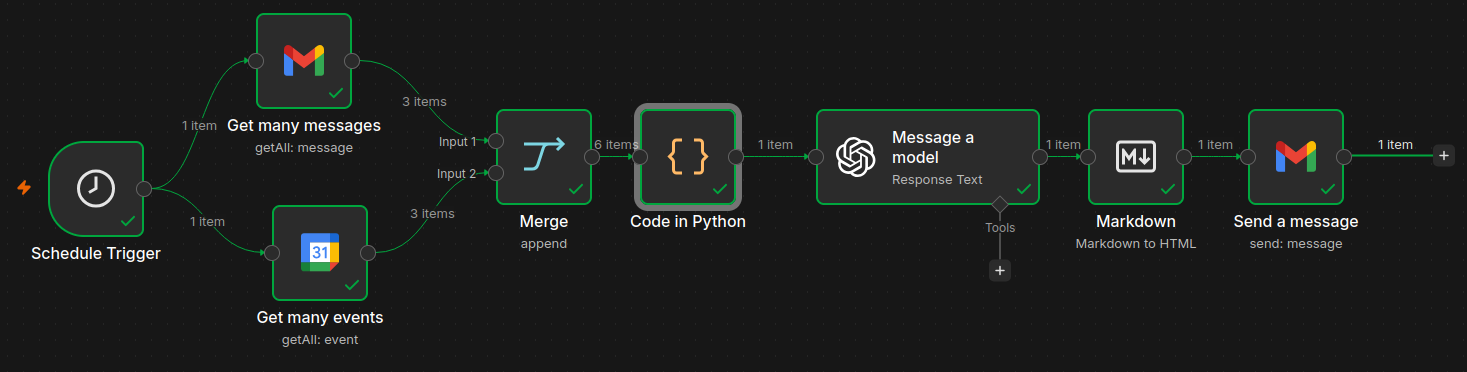
Breaking the workflow into layers ended up being one of the most important design decisions I made. Each layer had a single responsibility: retrieval gathered information, preparation cleaned and structured it, the AI reasoned about it, and the presentation layer handled delivery.
The result was a workflow that was easier to understand, easier to debug, and easier to improve.
The Merge Node That Taught Me a Bigger Lesson
One of the most valuable lessons I learned had nothing to do with AI.
Early versions of the workflow retrieved email and calendar information separately and then passed the results downstream. The workflow appeared to work. But something strange kept happening.
The final briefing was being generated twice. The email was being sent twice.
The AI wasn't confused. The prompt wasn't broken. The workflow was.
The issue was that email and calendar data were traveling through separate execution paths. Instead of receiving one combined context, downstream steps were executing once for the email data and again for the calendar data.
The solution was surprisingly simple: a merge node that combined both data sources into a single execution context before any cleanup or analysis occurred. Immediately the duplicate executions disappeared.
What struck me was that the problem wasn't an AI problem at all. It was a systems design problem. And the fix had nothing to do with prompts, models, or reasoning.
The more I build these workflows, the more I find that many AI problems are actually orchestration problems.
The AI Shouldn't Clean Your Data
The biggest realization during the n8n rebuild was that the AI should not be responsible for cleaning data. That work should happen before the model is called.
Instead of feeding raw email and calendar data directly into the model, I used Python to transform both sources into a simplified format containing only the information that mattered:
- Meeting titles
- Dates and times
- Participants
- Email subjects and summaries
- Actionable details
Conference IDs, reminder settings, OAuth metadata, calendar formatting — gone. By the time the model saw the data, the context had already been prepared.
The AI was no longer acting as a parser. It was acting as a reasoning engine.
The briefings became shorter, more focused, and more useful. Token usage dropped because the model wasn't processing information that had no bearing on the output.
The Lesson I Didn't Expect
When I started this project, I assumed the most important component would be the model. Now I think the model is often the least interesting part.
The real work happens before the prompt: data collection, workflow design, context preparation, filtering, transformation, prioritization. The model can only reason about the information it receives. Give it noise, get noise back. Give it a clean, structured context, and even a simple prompt produces something useful.
From AI Chat to AI Systems
The biggest shift wasn't technical. It was conceptual.
I started this project asking: "How can I use AI to summarize my day?"
I ended up asking: "What events should trigger AI reasoning?"
That may sound like a small distinction, but it fundamentally changes how you think about AI. Instead of a chatbot waiting for a prompt, AI becomes a component within a larger system.
A project document changes. A meeting transcript is uploaded. A support ticket is escalated. A customer health score drops.
Those events trigger workflows. The workflows gather context. The AI performs reasoning. The output drives action.
Once I started thinking this way, the prompts became less interesting than the systems surrounding them.
Where This Goes Next
The current n8n workflow is still version one. I'd like to incorporate project notes, interview preparation materials, and knowledge bases. I'd like to automatically identify action items and open loops, experiment with meeting preparation agents, and eventually build event-driven workflows that regenerate analysis whenever new information appears.
But the biggest takeaway isn't a feature on that list.
It's that the bottleneck in most AI workflows isn't the model — it's everything upstream of it. The organizations that create the most value won't necessarily be the ones with access to the largest models. They'll be the ones that have figured out which events deserve AI attention, how to prepare context worth reasoning about, and how to route the output somewhere it can actually change something.
That's what I learned from building a daily briefing tool. And I suspect it applies well beyond my inbox.